Langchain学习笔记
最近在研究langchain和langgraph,记录一下学习过程。
参考文章
- Agent入门说明:https://medium.com/data-science/building-a-simple-agent-with-tools-and-toolkits-in-langchain-77e0f9bd1fa5
- 工具链文档:https://python.langchain.com/docs/integrations/toolkits/
- DeepSeek配置:https://docs.langchain.com/oss/python/integrations/chat/deepseek
- 模型文档:https://docs.langchain.com/oss/python/integrations/chat
- LangGraph概览:https://docs.langchain.com/oss/python/langgraph/overview
环境配置
python3 -m venv venv
source venv/bin/activate
pip install langchain langchain_openai langchain-deepseek
pip install -qU langchain-deepseek
调用DeepSeek的demo
from langchain_deepseek import ChatDeepSeek

llm = ChatDeepSeek(
    model="deepseek-chat",
    api_key="sk-xxxxxxxxxxxxxxxxxxxxxxxxxxxxxxxx",
    api_base="https://api.deepseek.com/v1",
    extra_body={"reasoning": {"enabled": True}},
    temperature=0,
    max_tokens=None,
    timeout=None,
    max_retries=2,
)

messages = [
    ("system", "You are a helpful assistant that translates English to Chinese. Translate the user sentence."),
    ("human", "I love programming."),
]

ai_msg = llm.invoke(messages)
print(ai_msg.content)
langchain-tool
工具定义需要保留类型声明,这样对AI更友好。
from langchain.tools import tool

@tool
def search_database(query: str, limit: int = 10) -> str:
    """Search the customer database for records matching the query.

    Args:
        query: Search terms to look for
        limit: Maximum number of results to return
    """
    return f"Found {limit} results for '{query}'"
自定义工具名称:
@tool("web_search", description="Performs web search.")
def search(query: str) -> str:
    """Search the web for information."""
    return f"Results for: {query}"
工具运行时状态获取:
from langchain.tools import tool, ToolRuntime

def get_weather(city: str) -> str:
    runtime: ToolRuntime
    print(runtime.state["messages"])
langchain-model
模型是智能体的推理引擎,驱动智能体的决策过程。
模型支持三种调用方式:直接调用、流式调用、批量调用。
# 直接调用
response = model.invoke(conversation)

# 流式调用
for chunk in model.stream("Why do parrots have colorful feathers?"):
    print(chunk.text, end="|", flush=True)

# 批量调用
responses = model.batch([
    "Why do parrots have colorful feathers?",
    "How do airplanes fly?",
    "What is quantum computing?"
])
for response in responses:
    print(response)
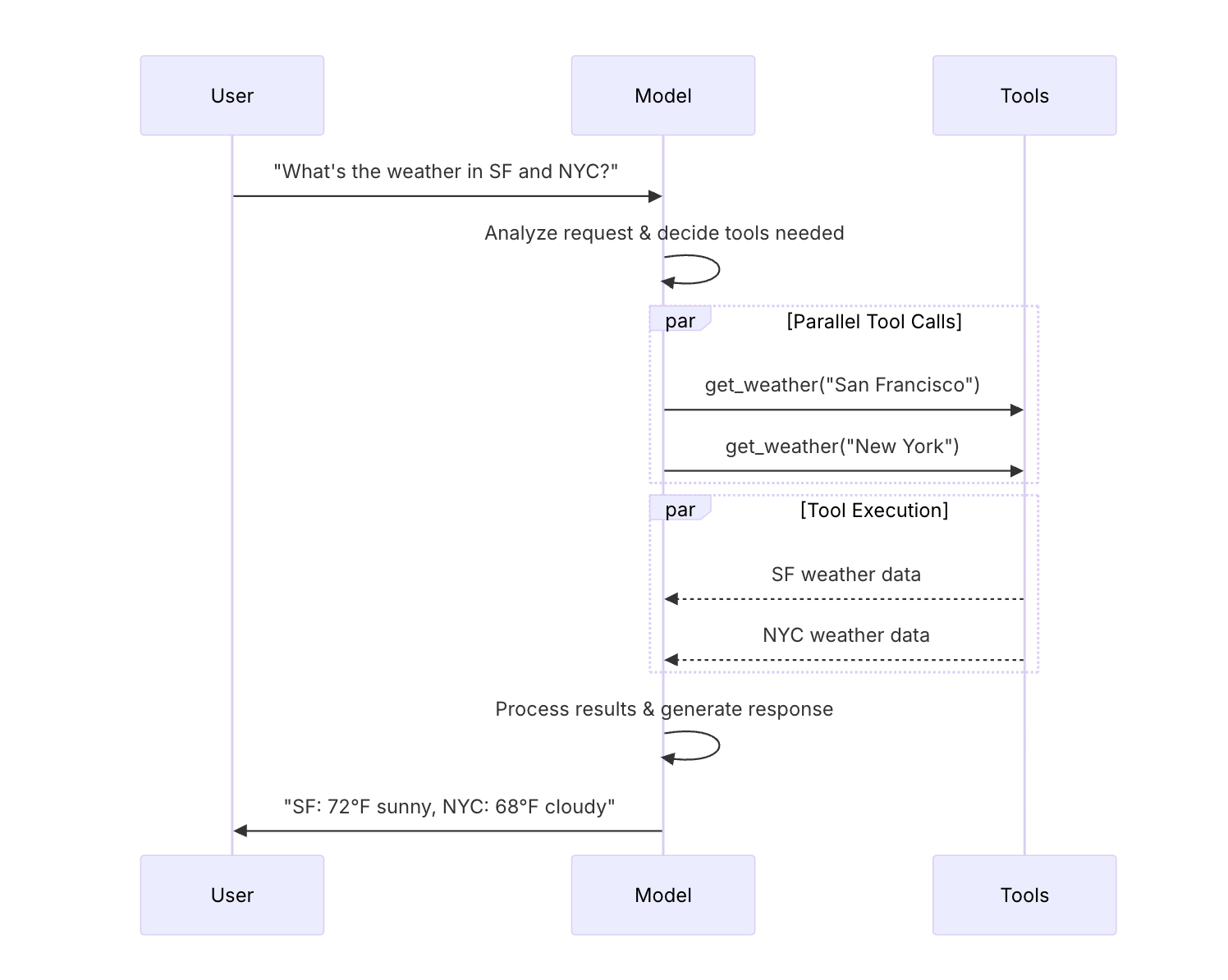
模型与工具绑定:
llm = llm.bind_tools([get_weather])

ai_msg = llm.invoke(messages)
for i in ai_msg.tool_calls:
    print(i)
langchain-agent
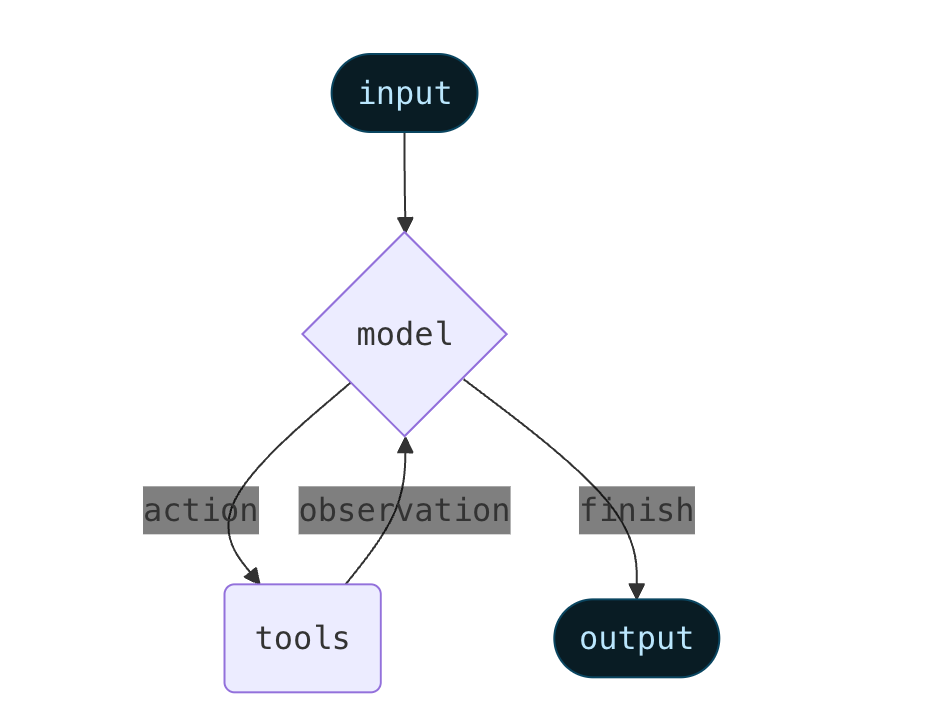
智能体将语言模型与工具相结合,创建能够对任务进行推理、决定使用哪些工具并迭代地寻求解决方案的系统。
from langchain.agents import create_agent

llm = ChatDeepSeek(
    model="deepseek-chat",
    api_key="sk-xxxxxxxxxxxxxxxxxxxxxxxxxxxxxxxx",
    api_base="https://api.deepseek.com/v1",
    extra_body={"reasoning": {"enabled": True}},
    temperature=0,
)

tools = [get_weather]

agent = create_agent(llm, tools=tools)
response = agent.invoke({"messages": [HumanMessage("今天成都的天气怎么样?")]})
print(response)
langgraph
LangGraph用于构建有状态的agent工作流。
基本步骤:
- 定义状态
- 定义模型节点
- 定义工具节点
- 定义结束条件
- 构建图并编译
from langgraph.graph import StateGraph, MessagesState

# 新建工作流
agent_builder = StateGraph(MessagesState)

# 新增节点
agent_builder.add_node("agent", model_node)
agent_builder.add_node("tools", tool_node)

# 新增边界连接节点
agent_builder.add_conditional_edges("agent", should_continue)
agent_builder.add_edge("tools", "agent")

# 编译图
agent = agent_builder.compile()
使用注意点:
- 工具函数保持无状态特性
- state的处理在tool_node中更新
- 集中管理时间记录逻辑
- 不依赖工具是否支持ainvoke
jupyter调试
用jupyter调试langgraph可以快速看到生成的图和代码。
source venv/bin/activate && jupyter lab